Feature #27105
[OEE][Performance] P1 ใช้ค่า Job Target เต็มไม่ต้องผันตามเวลา #kiro
0%
Description
ปรับ logic การคำนวณ P1 (Production Plan) ในหน้า Performance Dashboard:
1. P1 บนกราฟ (แต่ละ sample)
- ยกเลิกการหาร target ตามสัดส่วนเวลา (ไม่ใช้ interpolation อีกต่อไป)
- ใช้ค่า `job.target` ตรงๆ ตาม Job ที่ตรงกับช่วงเวลา sample นั้น
- Job Target จะถูกตั้งเป็นค่าต่อกะงาน เช่น กะ 08:00–16:55 target = 1000 → P1 ของ sample ในกะนี้ = 1000
- กรณีกราฟ group เป็นวัน → P1 = sum ของ job.target ที่ตรงกับช่วงเวลา sample ในวันนั้น
2. P2 (Machine Working)
- คำนวณตามเดิม
- ปัดทศนิยมลง (Math.floor)
3. Summary Table — P1
- P1 = `SUM` ของทุก Job ในช่วงเวลาที่เลือก
- ตัวอย่าง: กะเดียว target = 1000 → Summary P1 = 1000
Files
History
Updated by Supparoek Sariphan 15 days ago
- Status changed from New to Resolved
- Assignee changed from Supparoek Sariphan to Suphawan Phiwngam
- นำ AI มาช่วย(%) changed from 0 to 100
Backend —
oee-lib-v1.3.js
ก่อน: คำนวณ target_per_hour = target ÷ total_job_duration_hours แล้วใน timepoints loop ใช้ p_target_per_sample += target_per_hour × (matched_sec / 3600) → ได้ค่า P1 เป็นสัดส่วนตามเวลา
หลัง: ใช้ p_target_per_sample += job.target_value ตรงๆ สำหรับแต่ละ Job ที่ overlap กับ sample (deduplicate ด้วย ms_job_id เพื่อไม่นับซ้ำถ้า Job เดียวกันมีหลาย plan entry)
Frontend —
PerformanceDashboard.js
P1 (Production Plan) — ปัดเป็นจำนวนเต็ม (toDecimalPlaces(0))
P2 (Machine Working) — ใช้ Math.floor() ปัดลง
Actual — ใช้ Math.floor() ปัดลง
Diff (Actual-P1) — คำนวณจากค่าที่ floor/round แล้ว
Summary — P1 ใช้ Math.round, P2/Actual ใช้ Math.floor ทีละ entry แล้ว sum
CSV Export — ปรับให้ตรงกับกราฟ
Updated by Suphawan Phiwngam 15 days ago
- File Performance_Summary_P1_incorrect.png Performance_Summary_P1_incorrect.png added
- Status changed from Resolved to Feedback
- Assignee changed from Suphawan Phiwngam to Supparoek Sariphan
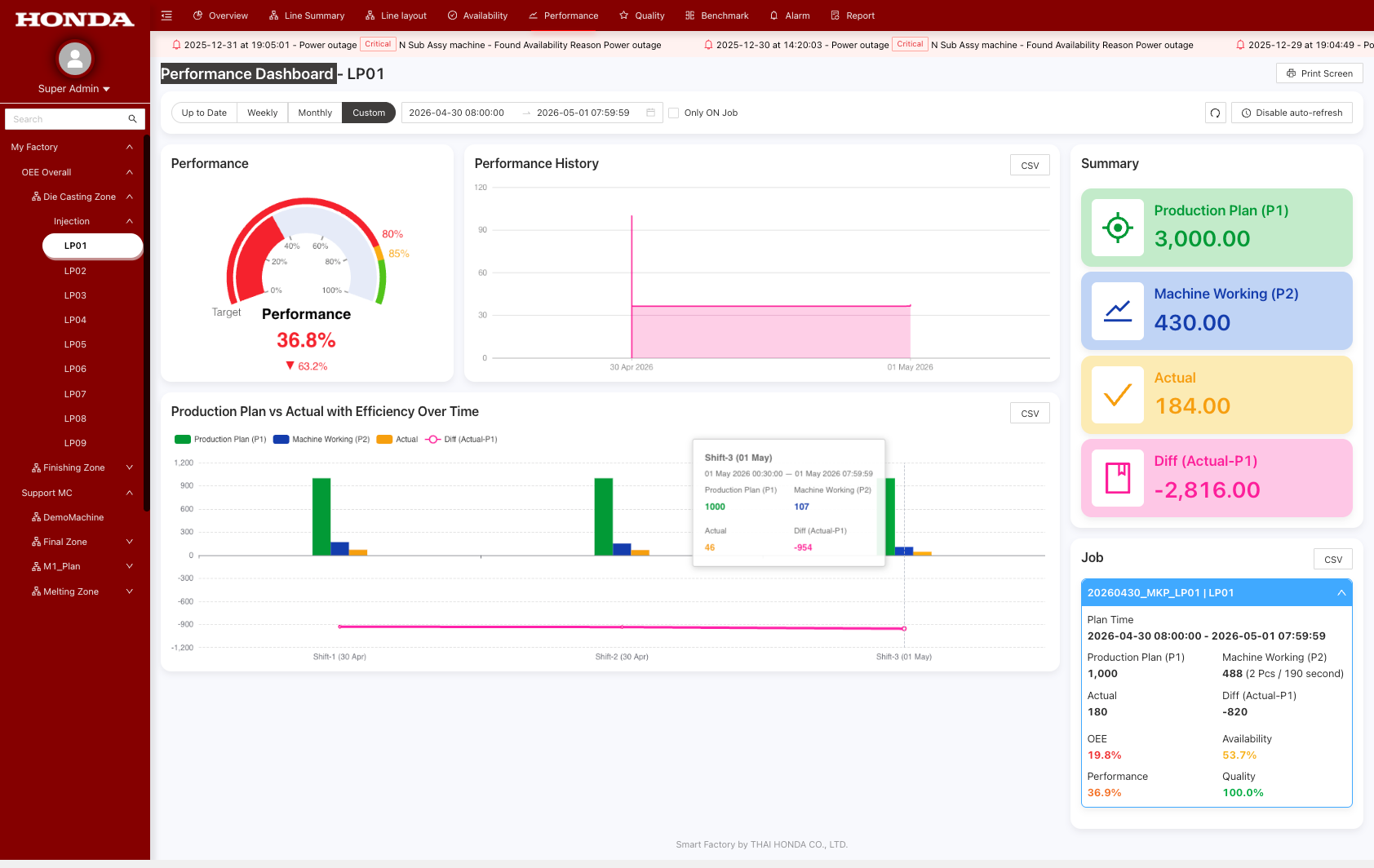
Summary ด้านขวา — Production Plan (P1) ต้องเป็นค่า `SUM` ของทุก Job ในช่วงเวลาที่เลือก ไม่ใช่ sum จาก P1 ที่แสดงบนกราฟแต่ละกะงาน
ตัวอย่าง: มี Job เดียว target = 1000 แต่กราฟแสดง 3 กะ (P1 = 1000 ทุกกะ) → Summary P1 ที่ถูกต้องคือ 1000 (sum จาก job.target) ไม่ใช่ 3000 (sum จากกราฟ)
ปัจจุบันแสดง 3,000 ซึ่งไม่ถูกต้อง — ดู screenshot แนบประกอบ
Updated by Supparoek Sariphan 14 days ago
- Status changed from Feedback to Resolved
- Assignee changed from Supparoek Sariphan to Suphawan Phiwngam